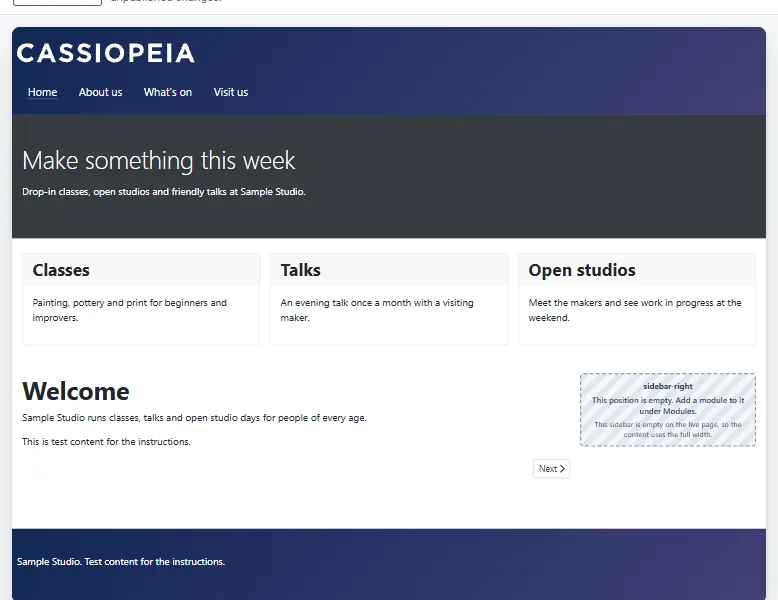
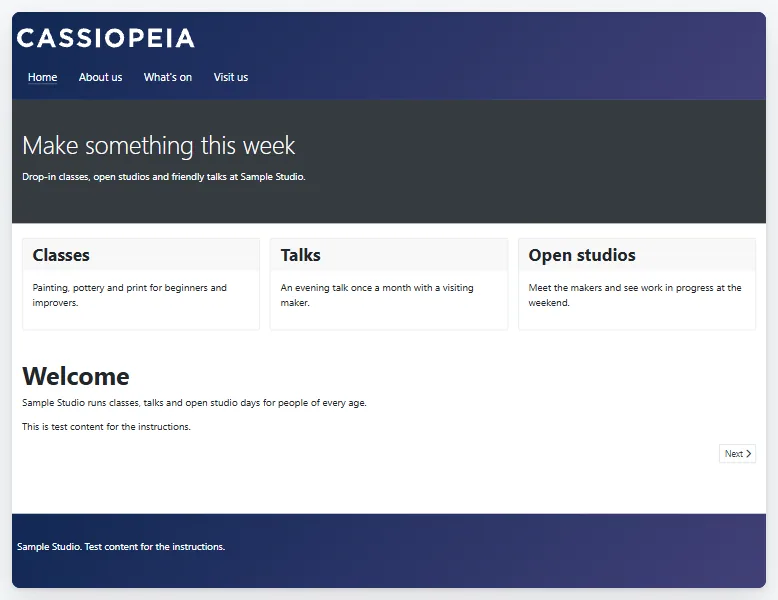
A part of the page that has nothing to show prints nothing at all. An empty sidebar disappears, and the main column takes the full width. An empty row leaves no colour and no gap. A section with nothing to show leaves out its colour, its picture and its space. This page explains what "empty" means, what the editor shows you, and why this lets one layout serve the whole site.
The rule
A position is empty when no module in it has anything to print for this page and this visitor. Webal Layouts asks Joomla this question in the same way as Cassiopeia's own page does, so a layout and a standard Cassiopeia page agree.
Every level then follows one rule.
- An empty sidebar is not printed. The main column takes its width, as it does on a standard Cassiopeia page.
- A column in a row with nothing in it is dropped. Its neighbours keep their widths.
- A row with nothing left prints nothing at all, not even its colour or its space. The next row moves up, with no gap above it.
- A section whose rows all have nothing to show prints nothing at all, not even its background colour, its background picture or its space. The same is true of a section of columns whose positions all have nothing to show.
- The Component with nothing left prints nothing at all: no colour, no ID and no classes.
- The page content is never empty. A section or row that holds it always prints.
What counts as empty
We tested these cases on a real Joomla 6 site. In each case a module was the only one in the sidebar, in a row and in a column of a row.
| The module is | The part counts as |
|---|---|
| Not published | Empty |
| Published, but not assigned to this page | Empty |
| Past its finish publishing date, or not yet at its start date | Empty |
| For an access level that this visitor does not have | Empty |
| A module that really prints nothing, such as the Banners module with no banner to show | Empty |
| A Custom module with no text at all | Present, not empty |
The last line of the table surprises people. A Custom module prints its own outer box even when it holds no text. Joomla counts that outer box as output, so the module counts as present. Stock Cassiopeia behaves in exactly the same way, so a layout and a standard page agree here too.
What the editor shows
The editor cannot know what each visitor sees. It only knows how many modules are published in a position. So it is careful with its words.
- On a sidebar where no module is published, the outline says empty. The preview box and the sidebar's panel say "This sidebar is empty on the live page, so the content uses the full width."
- On a sidebar where modules are published, the panel says "This sidebar has modules. If none of them shows anything for a visitor, the content uses the full width." The editor cannot tell whether a published module prints anything on the page, so it does not say the sidebar is empty.
- In the preview, an empty position shows a box that says "This position is empty. Add a module to it under Modules."
To see the real answer, press Show it as visitors see it above the preview. See Live preview and the visitor view.
A Component whose rows are empty but whose sidebar is not
If the rows hold nothing, but the sidebar holds modules, the sidebar still prints, in its usual quarter of the page. The Checks tab warns you that the Component "has a sidebar with modules, but its rows hold nothing. Only the sidebar would show, in its usual quarter of the page."
One layout for the whole site
Because empty parts print nothing, one default layout can serve every page of a site. Put all the sections that any page needs into it, and let Joomla decide which modules show where. This is the Joomla way.
- Build one layout with every band the site uses, for example a hero, a menu band, a call to action and the Component.
- Make its style the Default style, or assign it to the pages under Where this layout is used. See Using a layout.
- Open each module under Modules and set its Menu Assignment to the pages that should show it.
On a page where none of a section's modules is assigned, the section is simply not there, and the sections above and below meet as if it never existed. Add a second layout only where a page's structure truly differs, for example a page with a sidebar on the other side.
Hide a module with its Menu Assignment, never with CSS. A module hidden with CSS still counts as present, so its section keeps its colour, picture and space, and the module is still loaded for every visitor.
Columns side by side keep their width
In an ordinary section or row with columns side by side, a column keeps its width when its neighbour is empty. The editor says "Columns keep their width when a neighbour is empty. For a sidebar that disappears when empty, use the Component with a sidebar."
Error pages and the offline page
These two page types count differently. A position counts as present when a module is assigned to it, even if the module prints nothing. A sidebar that holds such a module therefore stays in place on an error page.
How we checked
On 5 November 2026 we compared a layout page with a standard Cassiopeia page that had the same content, at seven screen widths in light colours. The sidebar went through five states: empty, one module in the right sidebar, a module in each sidebar, empty again, and two positions in one sidebar. With the strictest computer check, 28 of the 35 pairs were identical dot for dot. Two pairs at 2,560 pixels wide differed in two dots by one shade, inside a gradient, and the difference did not come back when we repeated the test. Three pairs, which used a second sidebar position, were 16 pixels shorter. That is the small known difference in The Component, its sidebars and rows.
Try it
- Open a layout that has a Component with sidebar (right), or add one.
- Check that no published module is assigned to the position
sidebar-right. - Click Right sidebar in the outline, and read the note in its panel.
- Press Show it as visitors see it above the preview. The empty sidebar disappears and the rows use the full width.
- Press the button again to go back to the boxes.
- If the layout has a section with rows, make sure that no published module is assigned to its positions, and press Show it as visitors see it again. The whole section, with its colour or picture, is gone.