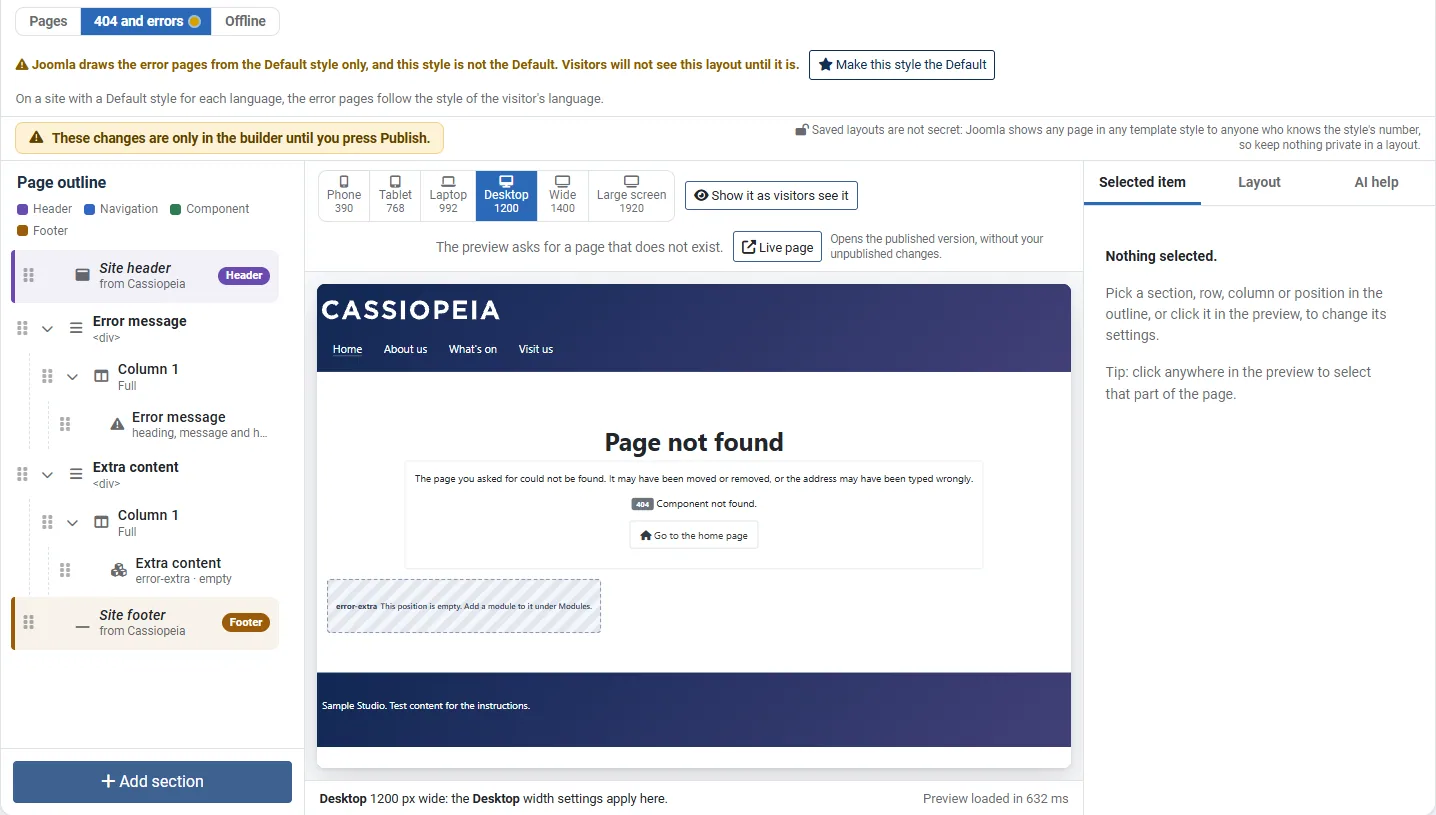
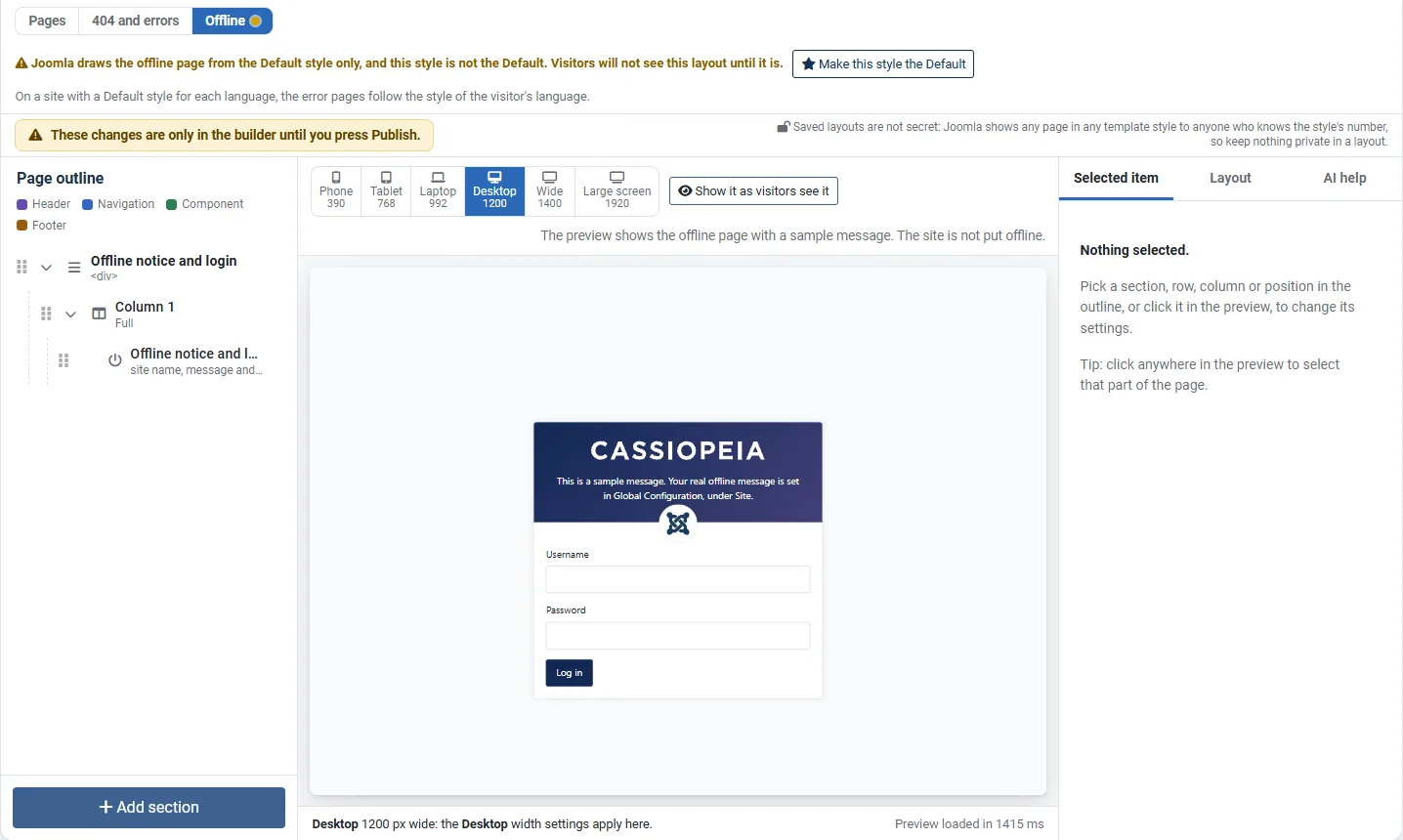
A layout is not only for ordinary pages. The editor has three page types: Pages, 404 and errors and Offline. This page explains the last two, and the fixed blocks that each page type needs.
The three page types
Choose the page type with the switch under the top bar of the editor. Each page type has its own layout and its own Publish. A small mark on the switch says when a page type has unpublished changes.
| Page type | What visitors see | Which pages use it |
|---|---|---|
| Pages | Your ordinary pages. | The menu items that you choose. See Using a layout. |
| 404 and errors | The page for a missing page (404) and for other errors that Joomla turns into an error page, such as 403. | The Default style only. |
| Offline | The page that shows while the site is offline. | The Default style only. |
Error and offline pages follow the Default style
An error page or the offline page has no menu item, so Joomla uses the Default style for it. A layout for these pages shows only when its style is the Default. If it is not, the editor says: "Joomla draws the error pages from the Default style only, and this style is not the Default. Visitors will not see this layout until it is." Next to this note you find the button Make this style the Default.
Think before you press it. The button asks you to confirm, names the style that loses its star, and says how many pages change. Making a style the Default changes every page that does not choose its own style. Joomla's own Site Template Styles screen puts the star back on another style when you want to undo it.
The fixed blocks
A layout has a few fixed blocks. They print something that Joomla provides, and each layout needs exactly one of its own kind.
| Block | Used in | What it prints |
|---|---|---|
| Page content | Pages | The article, blog list, form or other page that the menu item points to, with Joomla's messages above it. Every page layout needs exactly one. |
| Error message | 404 and errors | A heading, a plain explanation, the error code and a link to the home page. An error layout needs exactly one, so visitors are told what went wrong. |
| Offline notice and login | Offline | Cassiopeia's own offline card: the site name or logo, the offline message and picture from Global Configuration, and the login form for administrators. An offline layout needs exactly one, so an administrator can always log in. |
| Breadcrumb trail | Pages and errors | The breadcrumb trail of the page, drawn by Cassiopeia's breadcrumbs position. A layout can have one. Its position name is always breadcrumbs. |
The search box and the site logo are not fixed blocks. They live in Cassiopeia's site header, and you set them under Modules and in the template style.
The breadcrumb trail shows nothing until the Breadcrumbs module is published in the position breadcrumbs. The editor says "No module is published in the breadcrumbs position yet. Add the Breadcrumbs module to the breadcrumbs position under Modules."
The words of the error message
| Error | Heading |
|---|---|
| 404 | Page not found |
| 403 | You cannot view this page |
| Other 4xx errors | This page cannot be shown |
For a 404, the plain sentence is "The page you asked for could not be found. It may have been moved or removed, or the address may have been typed wrongly." Only errors in the 400s draw a layout. If your server has a real fault (an error in the 500s), visitors see Cassiopeia's own error page and none of your layout. This is on purpose, because a failing server should not be asked to build more.
Modules on an error page
The preset Centred message with a place for a module leaves a position called error-extra. Put any module you like in it, such as a menu or a search module. The preset does not add a search box of its own.
No modules while the site is offline
Joomla loads no modules while the site is offline. So an offline layout can hold the offline notice and plain sections only. The editor says "Joomla loads no modules while the site is offline, so the offline page can hold the offline notice and login only." An offline layout also has no site header or footer, because Cassiopeia's offline page has none. The breadcrumb trail is not allowed in an offline layout either.
The preview of these pages
- The preview of 404 and errors is a real 404 page. It asks for a page that does not exist.
- The preview of Offline is Cassiopeia's own offline card with a sample message: "This is a sample message. Your real offline message is set in Global Configuration, under Site." The site is not put offline.
Try it
- Open a layout in the editor, and press 404 and errors above the preview.
- Look at the preview, a centred message with a place for a module.
- If the note says that this style is not the Default, read it. On a test site only, you can press Make this style the Default and confirm.
- Press Offline, and look at the preview of the offline card.
- On a test site, make a page address that does not exist, such as
/no-such-page, and open it to see the 404 layout.