On a phone, the Add to cart button is often far down the page. The phone Add to cart bar keeps it within reach: a bar at the bottom of the window with the price and an Add to cart button.
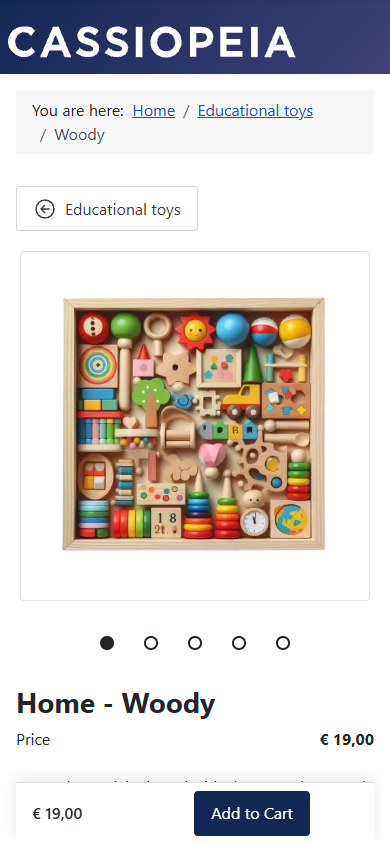
Switch it on
- In the builder, select The whole page (select nothing in the outline).
- In Phone Add to cart bar, choose On, below 768 pixels.
- Press Publish.
When it shows
- Only on screens narrower than 768 pixels.
- Only while the real Add to cart button is out of view: above or below the window. When the real button comes into view, the bar hides.
- Only where the visitor's browser runs scripts. Without scripts, the page has the real button only.
- Only when Phoca Cart shows a standard Add to cart button. If Phoca Cart's Options hide it, the bar never shows, and the checks warn.
The bar's space is kept from the start, so showing or hiding it never moves the page.
What its button does
Its button presses the real Add to cart button. So the options and the quantity the visitor chose are always used, Phoca Cart's check of required options still runs, and the cart works exactly as with the real button. The bar never sends the order form itself.
Its price
The bar shows the price Phoca Cart shows to pay: a cart discount, else a product discount, else the normal price. When the visitor chooses an option that changes the price, the bar's price changes too.
Back to top
Cassiopeia can show a "Back to top" link in the bottom corner. The bar keeps that corner free, so the link stays visible and can still be pressed.
Next: Checks and publishing.